
Taylor Precision Products London is one of the best cities in the world for remote work. You don’t need some fancy office. All you need is a good seat, a fast WiFi connection and an acceptable flat white within arm’s reach.
But the struggle to find the optimal cafe to work from? That’s trickier than it sounds.
Some places are too loud. Some have terrible internet. Some scowl at you as soon as your laptop bag hits the ground. If you have been there, this guide is for you.
So we’ve rounded up 7 of the best laptop cafes London can offer, from bustling Shoreditch to leafy Bloomsbury, where you can actually get stuff done. Each callout covers WiFi quality, seating, power sockets, noise level and what to order.
Let’s get into it.
The Exploded Cafes of London: How Work Culture Blew Up
Remote work changed London. Since 2020, more than ever exchange their kitchen tables for cafe seats. A report from 2023, conducted by Instant Offices, discovered that nearly 60% of London freelancers work in cafes at least twice a week.
It makes sense. Cafes offer:
- A new place that encourages more concentration
- Inherent ambient noise (that research suggests aids creative tasks)
- An excuse to wear clothes and leave the flat
- Community, minus the forced office socialising
The good news? London’s cafe scene has responded. More establishments are now installing dedicated power sockets, laptop-friendly seating and a robust WiFi standard. Some even have quiet areas or book-in-advance seating.
This guide cuts through the noise (quite literally) and shows you where to head. For a broader look at working from cafes across the UK and beyond, Laptop Cafe Guide is a great resource to bookmark.
1. Attendant Coffee — Fitzrovia
The Underground Cafe That’s Great for Serious Work
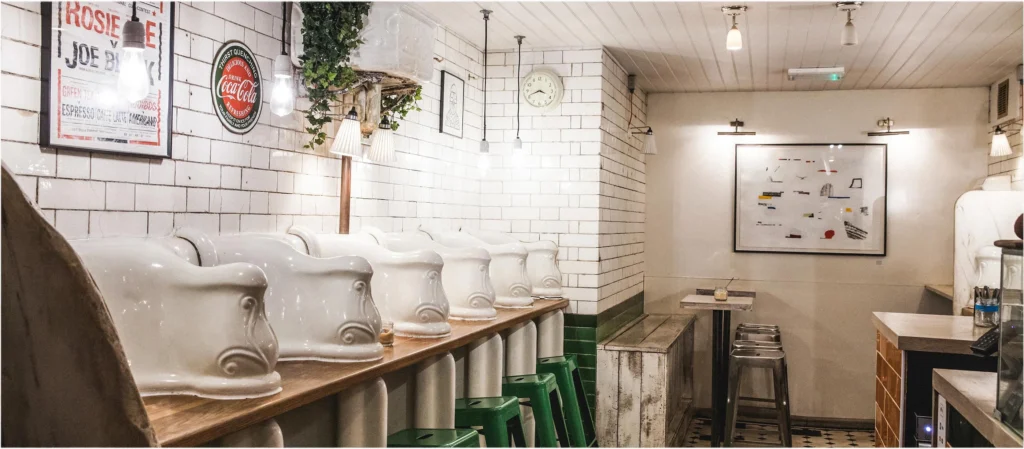
Attendant is one of those places no one quite talks enough about. In Fitzrovia, it’s housed in a beautifully refurbished Victorian public convenience (yes, a converted underground toilet — and it works a treat).
Its layout is long, narrow and intimate. Counter seating runs the entire length of the cafe, so nearly every seat can come with a power socket. It’s literally one of the most generous socketed cafes in all of London.
Why Attendant Works Well for Laptop Users
The WiFi is nice and fast — around 40–60 Mbps regularly. The music plays just low enough to be background. It is never so quiet that you feel weird typing, but also not so loud that you can’t hear yourself think.
Honestly, the coffee here is quite good. They roast their own beans, and the pour-overs are worth the wait. As for food, the avocado toast and egg dishes are popular enough, but portions are ample so you don’t feel guilty about staying for hours.
One note: between 9am and 11am on workdays the space fills up. For the best shot at comfortable seating, arrive before 9am or after 11:30am.
Best for: Writers, coders and anyone who needs focused, undisturbed work time.
| Detail | Info |
|---|---|
| Where | 27A Foley Street, W1W 6DY |
| WiFi Speed | ~50 Mbps average |
| Power Sockets | Plentiful (at almost every seat) |
| Noise Level | Low to medium |
2. WorkSpace by Timberyard — Seven Dials
The Most Laptop-Friendly Cafe in London (By Design)
Timberyard has a couple of locations in London, but for those working on laptops, the Seven Dials site is bigger and better. This place was designed to cater to remote workers, intentionally. That alone raises it up a notch.
Seating is a combination of large wooden tables, booths at the perimeter and lounge-style areas. Each table comes with built-in plug sockets. There’s a minimum spend during peak hours (approximately £5 per person), but that seems entirely reasonable when you consider how long people tend to stay here.
WiFi, Getting There, and the Working Environment
The WiFi consistently reaches 60–80 Mbps. The space is big enough that even on a bustling weekday, you won’t have trouble finding a seat. Noise is kept to a minimum — the music is soothing and the clientele are primarily other remote workers, so they all understand the unspoken “we’re all working here” rule.
They also serve proper food. Think grain bowls and toasties, with seasonal salads. This matters on long work days when you don’t want to pack up your entire rig just for lunch.
There’s a reason Timberyard has a reputation in the London laptop cafe scene. If you’re in search of a full-day workstation with decent coffee, this is likely your best bet.
Best for: All-day work blocks, calls (there are quieter corners), and anyone who wants a real office vibe without paying coworking prices.
| Detail | Info |
|---|---|
| Where | 7 Upper St Martin’s Lane, WC2H 9DL |
| WiFi Speed | 60–80 Mbps |
| Power Sockets | At every table |
| Noise Level | Low |
| Order This | The grain bowl + a large oat flat white |
3. Notes Coffee — Various Locations (Covent Garden, Moorgate)
Roomy, Chic and Smack in the Thick of Things
Notes Coffee is a small London chain with a devoted clientele among remote workers. Their most laptop-friendly sites are in Covent Garden and at Moorgate, owing to their size and seating layout.
What differentiates Notes from the other spots is the tables (real work space), high ceilings and lots of natural light. You don’t feel crammed in. You can spread a notebook, charger and laptop around without a stranger’s elbow in your side.
Notes Coffee at a Glance
The WiFi is solid. On a normal weekday most users get 30–50 Mbps. There are sockets, albeit not as plentiful as Timberyard or Attendant.
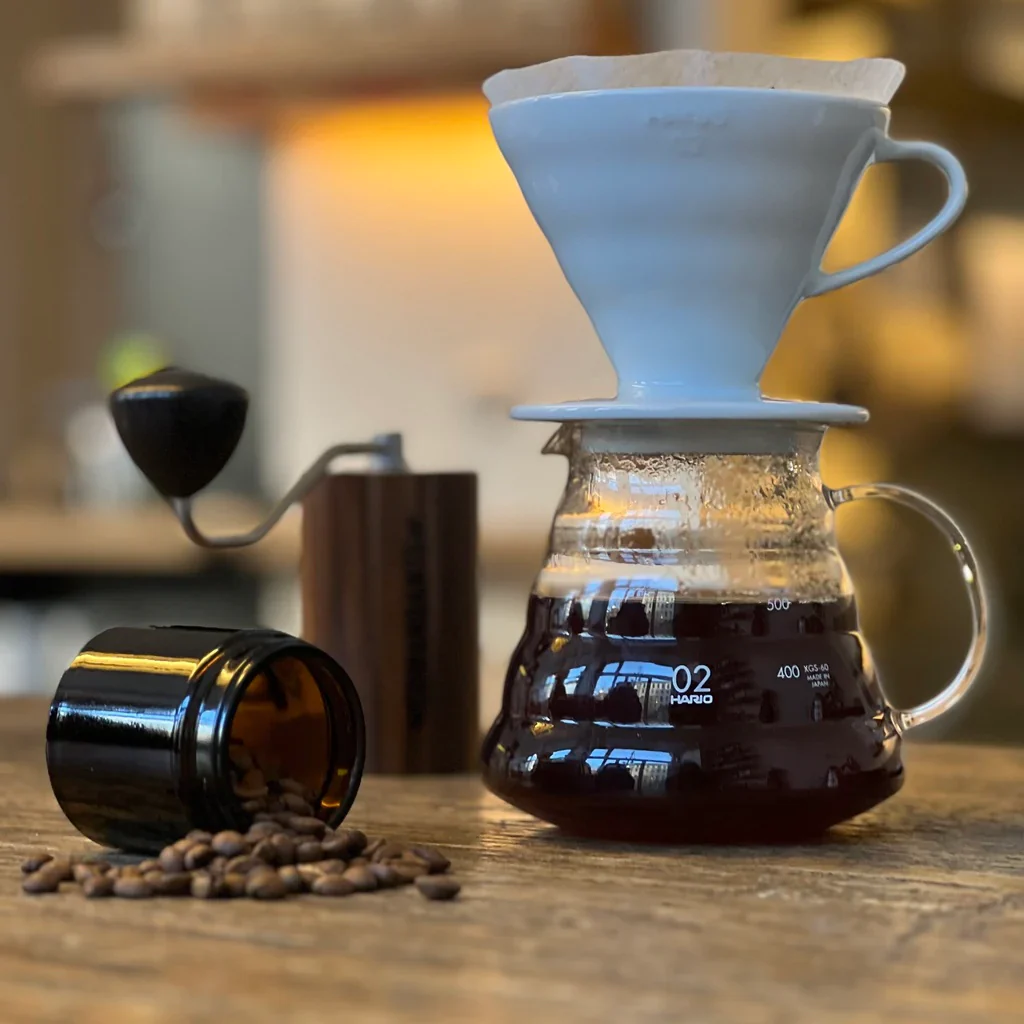
The coffee is great — Notes sources directly from certain farms, and they know what they’re doing. A batch brew is a good option if that caffeine boost is all you want and the wait for a pour-over would disrupt your workflow.
Notes has no time limit rule, although they can be quite busy during peak morning times (8:30am–10:30am). The Moorgate branch is usually quieter if you arrive mid-morning.
Best for: Anyone who wants a spacious, professional-feeling environment and works around Central London.
| Detail | Info |
|---|---|
| Locations | Covent Garden, Moorgate, Victoria |
| WiFi Speed | ~40 Mbps |
| Power Sockets | Medium availability |
| Noise Level | Mid |
| Order This | Batch brew or oat cortado and a slice of banana bread |
4. Ace Hotel London — Shoreditch
When You Need Ambience With Your Work Session
The Ace Hotel lobby bar in Shoreditch is an established name in the London remote working scene. It’s not a classic cafe — it’s a hotel lobby with good coffee, long opening hours and a very Shoreditch energy.
If you like to work around a bunch of creatives, this is the place. On any given morning, you’ll find designers sketching, founders making calls and writers doing whatever writers do while wearing headphones.
What to Expect at Ace Hotel
You won’t always get speedy WiFi here — expect 20–40 Mbps, depending on how busy the lobby gets. But it’s reliable. Power sockets are plentiful in the lobby, where seating includes large wooden tables, armchairs and low sofas.
The food and drink are managed by the on-site café. The coffees are good, and there’s always something to eat. You will pay more here than at an independent cafe — the cost of the atmosphere.
One thing to know: the Ace can get loud. It is a hotel lobby, after all. If absolute silence is required for deep work, bring quality headphones. But if buzz around you helps you concentrate, you’re in luck here.
Best for: Creative types, people-watchers, anyone who wants the buzz of Shoreditch with none of the distraction you’d get in a packed bar.
| Detail | Info |
|---|---|
| Location | 100 Shoreditch High Street, E1 6JQ |
| WiFi Speed | 20–40 Mbps |
| Power Sockets | Good throughout lobby |
| Noise Level | Medium to high (varies by time) |
| Order This | Flat white from the lobby bar |
5. Taylor Street Baristas — Bank / Shoreditch
A Proper Specialty Coffee Cafe That Welcomes Laptops
Founded in 2006, Taylor Street Baristas has established itself as one of London’s more serious specialty coffee venues. What’s impressive is how they’ve kept a bright welcome for laptop workers — something that many specialty coffee cafes fail to do.
Best branches for working: Bank and Shoreditch. Both have a fair number of seats, good table space and functioning power sockets.
Taylor Street: Why It Works for Remote Workers
The WiFi is solid — 40–60 Mbps. The staff are friendly and don’t judge you for setting up a workstation. The vibe is professional but not cold.
A perfect place to start your mornings. It can get busy during the City lunch rush (12–2pm), so bear that in mind if you want a quieter, more focused environment. Taylor Street also closes earlier than some competitors — usually by 4:30–5pm — so it’s not a great option for late-afternoon work.
Best for: City workers, early risers and people who take their coffee seriously.
| Detail | Info |
|---|---|
| Locations | Old Broad St (Bank), Mayfair, New St Square |
| WiFi Speed | ~50 Mbps |
| Power Sockets | Fairly plentiful |
| Noise Level | Moderate |
| Order This | Signature espresso or flat white and a pastry |
6. Watch House Coffee — Bermondsey / Various
Beautiful Spaces With a Specialty Coffee Pedigree
They began on Bermondsey Street and have grown across London. Every location is thoughtfully designed — they feel like spaces you want to be in, not just rush through.
The Bermondsey original occupies a converted Victorian guardhouse. It is small, but every inch has been well used. The Borough venue has larger table areas, making it more practical for laptop work.
What to Expect at Watch House
WiFi is fast and reliable — usually 50+ Mbps. The coffee is exceptional. Watch House has received accolades for their roasting and their barista training is apparent in each cup.
The weakest point here is the power sockets. They’re there, but not at every seat. Get there early to secure a plug-in spot.
Best for focused work for 2–3 hours, rather than an all-day camp. The smaller spaces are cosy but can feel cramped by midday. The Borough Market site has more space.
Best for: Productive mornings or afternoons, specialty coffee enthusiasts and South London commuters.
| Detail | Info |
|---|---|
| Locations | Bermondsey St, Borough Market, Fetter Lane |
| WiFi Speed | 50+ Mbps |
| Power Sockets | Limited but available |
| Noise Level | Low to medium |
| Order This | Single-origin filter or an oat flat white |
7. Kaffeine — Fitzrovia
Where Serious Coffee and Seriously Good Work Come Together
Kaffeine has been a staple of London’s specialty coffee scene since it opened. The Fitzrovia branch, on Great Titchfield Street, is the more spacious of their two shops and the better option for laptop work.
This spot is popular for good reason — and it gets busy. But the customers are mostly office workers, freelancers and media professionals who understand the social contract of a working cafe. Nobody’s going to bother you.
Kaffeine for the Working Day
The WiFi generally runs in the 40–50 Mbps range. Power is available at the bench seating and some of the table seats. The menu includes quality coffee and a solid food offering — the bacon and egg roll is legendary here.
Kaffeine has no policy on laptop-friendly hours, and the room is often spacious enough that you rarely feel forced out. The upstairs area is quieter and better for productive work.
What Kaffeine does differently: the consistency. This is not a hit-or-miss kind of place. The coffee is always solid, service is always fast and the vibe is always right for working. That reliability is more important than you might realise.
Best for: Getting work done with no fuss, in a lovely old London setting with excellent coffee.
| Detail | Info |
|---|---|
| Where | 66 Great Titchfield Street, W1W 7QJ |
| WiFi Speed | ~45 Mbps |
| Power Sockets | Yes, at bench seating |
| Noise Level | Medium |
| Order This | Flat white — benchmark quality |
How to Be a Decent Laptop Cafe Patron (And Keep Coming Back)
Before you set up your laptop at any of these places, there’s an unspoken code worth knowing. Follow it and you’ll always be welcome. Neglect it and you become that person.
- Buy something every 90 minutes to 2 hours. This is the golden rule. You are using their space, their electricity, their WiFi. A second cup of coffee, a piece of cake, a fizzy water — it doesn’t have to be costly.
- Don’t occupy a big table alone during peak hours. If the cafe is packed at 9am and you’re eating alone at a table for four, move to a corner spot or share.
- Use headphones for calls. Step outside if you can. If not, keep it short and low.
- Keep your setup compact. Laptop, charger, coffee and maybe a notebook. Not your entire office.
- Be aware of the vibe. Not all cafes are created equal when it comes to noise. Match the energy of the room.
What to Look for in a Good Laptop Cafe in London
Not all cafes are suitable for working. Here’s a quick checklist of what makes a great laptop cafe as opposed to one that merely tolerates laptops.
WiFi That Actually Works
For smooth video calls, you need at least 20 Mbps. For anything that involves uploading large files or extended video meetings, aim for 50+ Mbps. Always double-check it before committing to a full day. Many cafes display the WiFi password on a chalkboard or your receipt — hop on and run a speed test as soon as you arrive.
Power Outlets in All the Right Places
A cafe with sockets only at the counter is very different from one with sockets at every table. Find out which is which before your battery hits 15% at 2pm.
The Right Noise Level for the Work You Do
A study by researchers at the University of Illinois found that moderate ambient noise (around 70 decibels — roughly a cafe’s background hum) actually increases creative thinking. But for tasks requiring deep focus, such as coding or writing, something quieter is better.
Staff Who Don’t Rush You Out
The best cafes for laptop workers don’t treat you like a nuisance. You’ll know within the first five minutes of arriving whether you’re welcome to stay.
How to Make the Most of London’s Laptop Cafes
- Go early. Most popular cafes lose the best seats — corner spots, window seats with sockets — by 9am. Arrive at opening or just before.
- Have a backup. London cafes fill up fast, especially during school holidays and rainy days. Decide on your second choice before you need one.
- Use the lunch hour wisely. 12pm to 2pm is peak time. If you need a chunk of deep concentration, plan your break around this window.
- Come prepared. Bring a backup dongle. Even the fastest cafe WiFi can fail occasionally. Mobile data saves the day.
- Know the minimum spend. Some cafes on this list have minimum spend policies. Budget for one coffee and one food item every 2–3 hours and you’ll never have an issue.
Frequently Asked Questions About Laptop Cafes in London
Q: Is it impolite to use a laptop in a London cafe? Not at all — not in the cafes on this list, at least. They actively welcome remote workers. Just follow the unspoken guidelines: buy something from time to time, don’t dominate a big table alone during peak hours, and use headphones for calls.
Q: Where is the fastest WiFi in London cafes? Timberyard ranks highest with speeds of 60–80 Mbps. Watch House and Attendant also shine at 50+ Mbps. Always test when you arrive — WiFi speed varies depending on how many people are connected.
Q: Can I make video calls from a London cafe? Yes, but use headphones with a mic and keep calls short if the cafe is busy. Some have quieter corners good for longer calls. The Ace Hotel lobby and Timberyard are decent bets for extended video meetings.
Q: Are laptop users given a time limit at London cafes? Most don’t enforce official time limits — but it’s courtesy to buy something every hour or two. Timberyard has a minimum spend policy in place. A few independent cafes have signs asking you not to work on a laptop during busy hours (typically 8–11am on weekdays).
Q: What is the best area in London for working from cafes? Fitzrovia is excellent — quiet, walkable and loaded with quality choices like Attendant and Kaffeine. Shoreditch has its own good vibe for creative types. Bank and Moorgate have solid options near transport links for City workers.
Q: Are there cafes in London where I can reserve a seat? Some coworking-hybrid spaces allow bookings. Timberyard is moving in this direction. For conventional cafes on this list, it’s first-come, first-served. Get there before 9am if you want the pick of the seats.
Q: How much will I need to spend working from a London cafe all day? Budget £12–20 for a full day. That’s two or three coffees and at least one food item. Certain venues (like Ace Hotel) will skew higher.
The Final Word
London has a brilliant, and increasingly work-friendly, cafe culture. The seven spots in this guide cover every corner of the city, every type of remote worker and every budget.
Whether you want the polished calm of Timberyard, the underground charm of Attendant, the specialty-first approach of Watch House, or the Shoreditch energy of the Ace Hotel lobby — there’s somewhere for you here.
The trick is pairing the right cafe with the right kind of work. Understand your WiFi needs, your tolerance for noise and how long you’ll be there. Then pack your charger, pop in your headphones and go make something happen.
London is your office. You only have to know where to sit.