

If you’re a freelancer meeting deadlines, a student cramming for finals, or just a remote worker sick of your apartment — the right cafe can be a game-changer. Good WiFi, solid outlets, decent coffee, and a vibe that keeps you in the zone. That’s the dream.
This laptop cafe guide covers ten of the city’s best spots. Each has been selected for its work-friendly setup, ambiance, and overall bang for your buck. No time wasting — only venues that deliver.
Let’s dive in.
Why Choosing the Right Cafe Is More Important Than You Realize
Not all cafes are laptop-friendly. Some have a one-hour limit. Others charge for WiFi. Some have no outlets and tabletops the size of a dinner plate.
The wrong place stops you from being productive before you even open your computer.
The right spot? It can feel better than any office. Good light, background noise at just the right level, the smell of fresh coffee — it’s hard to beat.
The 10 Best Laptop Cafes in New York
1. Blank Street Coffee — Various Locations
Blank Street began as a little cart on a corner of Brooklyn. Today, it has cafes throughout Manhattan and Brooklyn — and all of them are laptop-friendly.
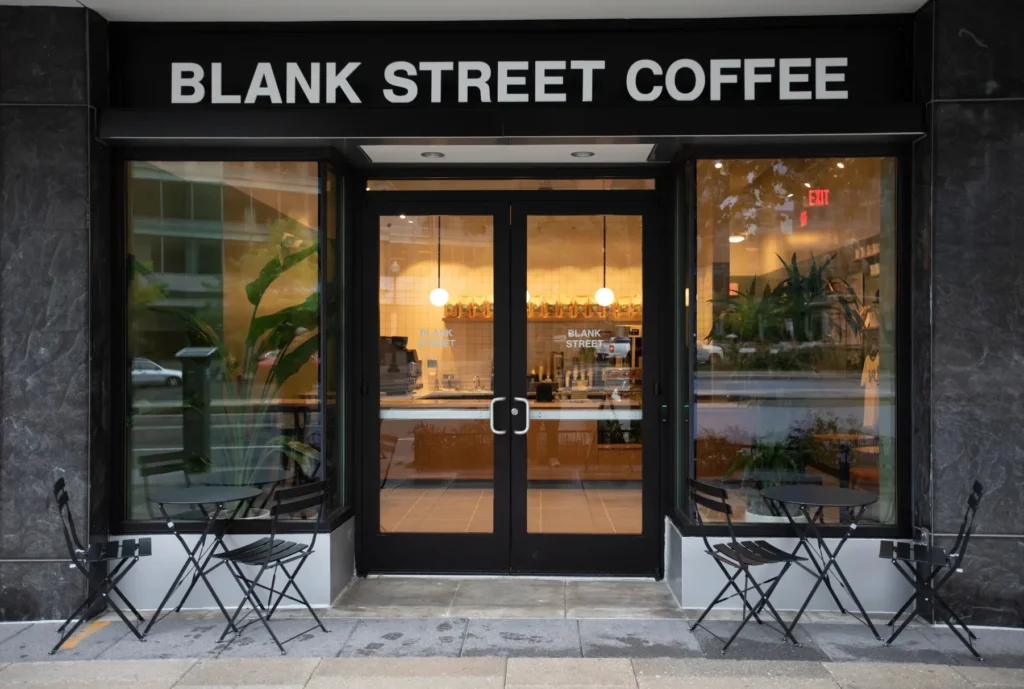
The WiFi is solid. Tables are wide enough that a full-size laptop fits with room for your coffee. The menu is minimal: matcha, espresso drinks, and some pastries. The prices are reasonable for New York.
It’s a good choice if you’re bouncing between neighborhoods — there’s a Blank Street nearly everywhere.
- Best for: Short bursts of work, students, traveling remote workers
- Neighborhoods: Various — Soho, Williamsburg, Upper West Side and more
- WiFi: Free and fast; no password required at most locations
- Noise level: Low to moderate
- Outlets: Available at most locations
2. Think Coffee — Greenwich Village and Elsewhere
Think Coffee has been a staple of the downtown NYC work-from-cafe scene for years. Its Greenwich Village spot is particularly popular with NYU students and writers.
The space is airy and open. Tables are well spread out, and you won’t feel squeezed in. The WiFi is reliable, and there are plenty of sockets to keep you powered through a marathon session.
They also serve fair-trade coffee, which is a bonus if that matters to you.
- Best for: Long work sessions, students, writers
- Neighborhoods: Greenwich Village, East Village
- WiFi: Free; password on receipt
- Noise level: Moderate
- Outlets: Good availability
3. Joe Coffee — Various New York City Locations
Joe Coffee is one of those places that does everything right. Great espresso. Comfortable seating. No rush to leave.
Their Waverly Place location in the West Village is a local freelancers’ favorite. The lighting is warm, the background noise is just enough to help you focus, and the baristas aren’t hovering over you.
Joe Coffee has several locations around the city, so you have options no matter what part of town you’re working from.
- Best for: Freelancers, creatives, coffee enthusiasts with work to do
- Neighborhoods: West Village, Upper West Side, Flatiron and beyond
- WiFi: Free, dependable
- Noise level: Low to moderate
- Outlets: Accessible — though some seats are better than others
4. Stumptown Coffee Roasters — Ace Hotel, Midtown
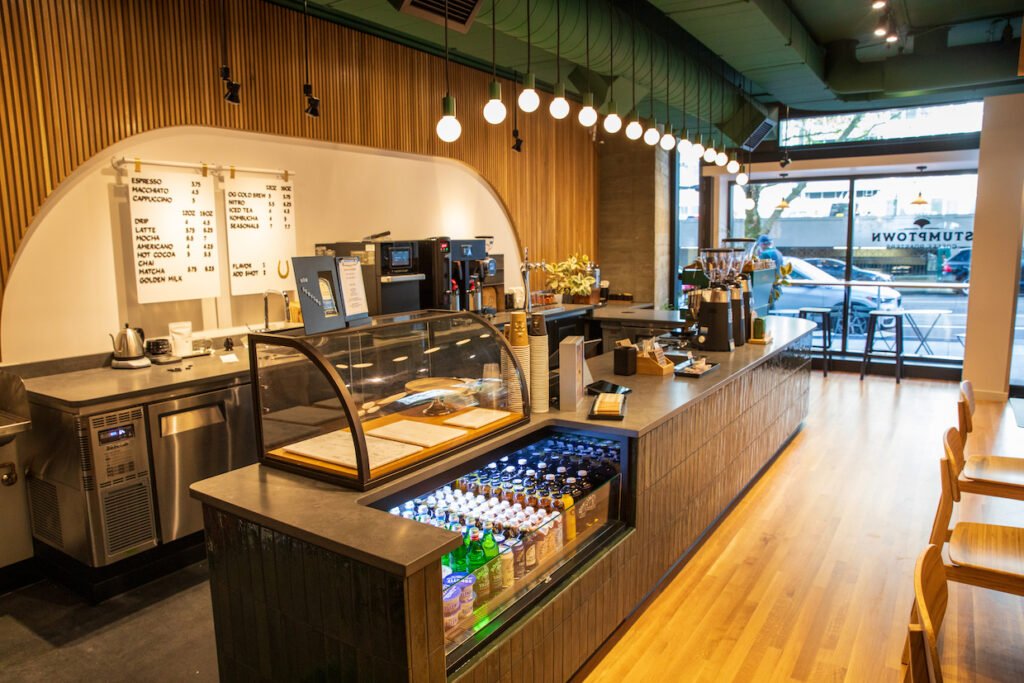
Stumptown at the Ace Hotel is something of an institution in NYC’s work-from-cafe landscape. The space is large and nicely designed without being pretentious.
It’s high-ceilinged, features long communal tables, and serves an excellent selection of coffee drinks. The WiFi handles high traffic well — which matters, because this spot tends to be packed.
The working space extends into the Ace Hotel lobby area. If you want a cafe with a more polished, editorial feel, Stumptown is worth the trip.
- Best for: Creative professionals, long work days, people who prefer a cooler atmosphere
- Neighborhood: Midtown West (29th St & Broadway)
- WiFi: Free and reliable even during peak hours
- Noise level: Moderate — can get loud by the afternoon
- Outlets: Good along perimeter walls and communal table edges
5. Café Grumpy — Chelsea & Other Locations
Don’t let the name fool you. The folks at Café Grumpy are friendly, the coffee is excellent, and the Chelsea location is an ideal place to get work done.
The interior is no-frills — clean, focused, and comfortable. You’re there to work, and Grumpy seems to know that. The WiFi is solid, and the staff welcomes you to stay a couple of hours as long as you buy something.
They also have outposts in Greenpoint, Park Slope, and the Upper East Side.
- Best for: Deep focus sessions, coffee purists
- Neighborhoods: Chelsea, Greenpoint, Park Slope, Upper East Side
- WiFi: Free with password posted behind the counter
- Noise level: Low to moderate
- Outlets: Limited but available
6. Ground Central Coffee — Various NYC Locations
Ground Central is a small local chain that mostly flies under the radar — and that’s precisely what makes it great.
The locations tend to be less touristy than more in-demand spots. The WiFi is good, the coffee is good, and the staff is low-key. Tables have enough room for serious laptop work.
The East 51st Street location near Grand Central is especially popular among business travelers and commuters who want to knock out some work before heading out.
- Best for: Business travelers, midday workers, anyone looking to avoid tourist-heavy spots
- Neighborhoods: Midtown East, Upper East Side
- WiFi: Free; good speeds
- Noise level: Low
- Outlets: Multiple per seating area
7. Devoción — Williamsburg & Flatiron
Devoción might be the most beautiful cafe in New York. The Williamsburg location has a soaring skylight and lush plant life that floods the interior with natural light — it feels more like a greenhouse than a coffee shop, in the best possible way.
But it’s not just about aesthetics. The WiFi is fast, the tables are large, and the coffee is some of the best in the city — sourced directly from Colombian farms.
It does get crowded on weekends, so aim for a weekday morning if you want prime seating.
- Best for: Creative workers, designers, anyone inspired by beautiful spaces
- Neighborhoods: Williamsburg (Brooklyn), Flatiron (Manhattan)
- WiFi: Free, fast
- Noise level: Moderate — quieter on weekday mornings
- Outlets: Good availability near wall seating
8. Toby’s Estate Coffee — Williamsburg & West Village
Australian-born Toby’s Estate brings a laid-back, industrial-chic coffee culture with it.
The Williamsburg location features exposed brick, large windows, and long tables that are perfect for spreading out. The West Village spot is smaller but warmer and cozier.
The coffee is excellent. The WiFi is reliable. And it delivers exactly what remote workers want — a vibe that’s productive without being stressful.
- Best for: Remote workers, freelancers, anyone who appreciates great coffee
- Neighborhoods: Williamsburg (Brooklyn), West Village (Manhattan)
- WiFi: Free, steady
- Noise level: Low to moderate
- Outlets: Available at both locations
9. Housing Works Bookstore Cafe — Soho
This one is a bit different. Housing Works is a bookstore-cafe hybrid and nonprofit institution — all proceeds benefit people impacted by HIV/AIDS and homelessness. That means your latte is doing some good in the world while you work.
The space is snug and eclectic — shelves lined with secondhand books, mismatched tables and upholstery. It’s quiet enough for serious work but social enough to feel alive. The WiFi is solid, and no one is rushing you out.
- Best for: Writers, book lovers, and people who want their money to go somewhere meaningful
- Neighborhood: Soho (157 Crosby Street)
- WiFi: Free, reliable
- Noise level: Very low — practically library-quiet
- Outlets: Limited; grab a seat near the wall
10. Butler — Nolita
Butler is a hidden gem in Nolita that deserves far more attention than it gets. It functions as a proper breakfast-and-lunch restaurant while also being one of the best laptop spots in lower Manhattan.
The design is minimalist and clean. The food is genuinely excellent — not just decent for a cafe, but restaurant-quality. The WiFi is solid, tables have power outlets nearby, and the staff doesn’t mind people working through the morning or afternoon.
It tends to clear out after the lunch rush, and the 2–5pm window is nearly ideal for uninterrupted work.
- Best for: Remote workers who also want a satisfying meal; creatives; freelancers in lower Manhattan
- Neighborhood: Nolita (146 Elizabeth Street)
- WiFi: Free, strong signal
- Noise level: Low
- Outlets: Found near most seating
All 10 Cafes at a Glance
| Cafe | Best For | Noise Level | Outlets | WiFi |
|---|---|---|---|---|
| Blank Street Coffee | Students, quick sessions | Low–Moderate | Most locations | Free, no password |
| Think Coffee | Long sessions, writers | Moderate | Good | Free, receipt PW |
| Joe Coffee | Freelancers, creatives | Low–Moderate | Accessible | Free, reliable |
| Stumptown (Ace Hotel) | Creatives, long days | Moderate | Good | Free, reliable |
| Café Grumpy | Deep focus | Low–Moderate | Limited | Free, password |
| Ground Central | Business travelers | Low | Excellent | Free, fast |
| Devoción | Designers, creatives | Moderate | Good | Free, fast |
| Toby’s Estate | Remote workers | Low–Moderate | Available | Free, steady |
| Housing Works | Writers, quiet work | Very Low | Limited | Free, reliable |
| Butler | Full-meal workers | Low | Good | Free, strong |
7 Tips to Make the Most of Laptop Cafes in NYC
1. Go During Off-Peak Hours The ideal windows are typically 9–11am on weekdays, or 2–4pm after the lunch crowd disperses. Some places are surprisingly quiet before noon on weekends. Avoid arriving right at lunch (12–1:30pm) — that’s when cafes fill up fast and good seats disappear.
2. Buy Something — Always, and Early This is the unwritten contract of working from a cafe. Nobody expects you to go broke, but buying something when you sit down is a sign of respect for the space. A coffee every few hours is a good cadence — it keeps the staff happy, fuels you, and secures your seat.
3. Bring Your Own Power Strip A small travel power strip can be a lifesaver. If you’re near one outlet and sharing a table, you can split it — and suddenly you’re the most popular person in the room. It also means you’re never stuck fighting for the wall seat.
4. Use Headphones as a Signal Even in quiet cafes, headphones signal that you’re in work mode. Most people will respect that and won’t interrupt. Noise-canceling headphones are especially useful in louder spots like Stumptown or Devoción during busy periods.
5. Choose the Right Cafe for Your Needs
- Total silence? → Housing Works or Ground Central
- Amazing coffee AND ambiance? → Devoción or Stumptown
- Tight budget? → Blank Street or Think Coffee
- Need reliable outlets? → Ground Central or Butler
- Working in Brooklyn? → Toby’s Estate or Devoción in Williamsburg
- Need a full meal? → Butler, hands down
What to Watch Out For at NYC Cafes
Time limits. Some cafes — particularly during weekend rushes — may ask you to give up your seat after an hour or two. Stay aware of how busy it’s getting around you.
WiFi quality can vary. Even in the same cafe, speeds may drop at peak times if everyone is streaming or on video calls. If you have an important call, test the connection first or bring a personal hotspot as backup.
Cash vs. card. Most NYC cafes have gone card-only, but some smaller spots still prefer cash. Worth checking ahead if you’re visiting somewhere new.
Noise levels shift throughout the day. What’s serene at 9am can be loud by noon. If silence is non-negotiable, arrive early or plan your schedule around it.
How to Be a Good Cafe Worker in New York
There are unwritten rules to New York cafe culture. Most of them come down to basic respect.
Don’t monopolize a four-person table by yourself. If the cafe is busy and you’re sitting alone at a large table while people are looking for seats, that’s not a good look. Take a smaller table or offer to share.
Keep video calls short — or step outside. Nobody wants to sit through your entire Zoom meeting. For quick calls, keep your voice down. For anything longer, take it outside or use a headset.
Pack up before you leave for a break. Don’t leave your laptop unattended on a table for 30 minutes. It’s a security risk, and it’s inconsiderate to people waiting for a seat.
Tip well. NYC cafe workers depend on tips. If you’ve spent three hours using their WiFi and outlets, leave a solid tip — it’s the right thing to do.
Frequently Asked Questions
Q: Are there NYC cafes without time limits for laptop users? Most independent cafes in New York don’t enforce strict time limits on weekdays. On busy weekend mornings, some may politely ask you to move if the cafe is full. Housing Works, Butler, and Ground Central are the safest bets for long sessions.
Q: Do I need to buy something to use WiFi at NYC cafes? At most cafes, yes — a purchase is required to get the WiFi password. At some places like Blank Street, it’s freely available. As a general rule, buying something when you arrive — and again every few hours — is both expected and appreciated.
Q: Which NYC neighborhoods have the most laptop-friendly cafes? Williamsburg in Brooklyn and the West Village/Greenwich Village area in Manhattan lead the way. Both have high concentrations of freelancers and students, so cafes in these areas tend to be more accommodating of long-stay laptop workers.
Q: Which is the best laptop cafe in NYC for video calls? Ground Central and Butler are solid picks — both tend to be on the quieter side. Stumptown also works if you can grab a seat away from the main crowd. Always test your WiFi before any major call.
Q: How much does it cost to work from a laptop cafe in NYC? At most places in this guide, a coffee runs about $5–$7. Spending $10–$15 over a few hours puts you comfortably in the clear with staff. Blank Street and Think Coffee are on the more affordable end.
Q: Can I safely leave my laptop on the table while going to the bathroom? A quick bathroom run is generally fine in a busy cafe with people around. But don’t leave your laptop unattended for long. New York is generally safe, but theft does happen in crowded cafes. When in doubt, pack it up.
Q: Are there any private or semi-private areas for calls at these cafes? Stumptown at the Ace Hotel has the most floor space to spread out and find a quieter corner. Devoción’s large floor plan helps too. If you need real privacy, consider a coworking space — or check your local NYC library branch, some of which offer free phone-booth-style pods.
Conclusion: Your Essential Guide to Laptop Cafes in New York
New York doesn’t lack for coffee shops. But finding one that actually works for your workflow — solid WiFi, real outlets, the right vibe, and no pressure to leave — takes a bit of research.
This guide covers 10 solid options across Manhattan and Brooklyn. Whether you’re a student pulling late nights, a freelancer juggling clients, or an office worker tired of working from home, there’s somewhere on this list for you.
The golden rule? Be a good guest. Buy something, tip well, and respect the space. In return, these cafes will offer you one of the finest work environments in the city — and in New York, that’s saying something.
Now close this tab, grab your bag, and get to work.