
Working from home sounds amazing until your baby sister plays music through the wall, your bed starts calling out to you and the fridge is your best friend every 20 minutes.
Cafes fix that.
A little distracting background noise that really helps you focus. It’s a reason to get dressed. There’s coffee. And most crucial of all, there’s a change of scene that rouses your brain.
Research has found that moderate background noise — the sort of thing you’d have in a cafe — can enhance creative thinking. It’s not silence, and it’s not disorder. It’s just right.
But here’s the problem: Not all cafes allow laptops. And not every cafe with a laptop-friendly vibe is affordable.
That’s why this guide exists.
What Makes a Cafe “Laptop-Friendly”?
But first, we need to get you prepped for what to avoid. A good laptop cafe is about more than Wi-Fi. A few key things that distinguish a good spot from one of those frustrating ones.
Fast and Free Wi-Fi This is non-negotiable. Slow internet makes everything worse. If you can, ask the staff to tell you what the speed of the Wi-Fi is, or run a speed test app when you’ve connected. Anything above 10 Mbps should be good for browsing and video calls.
Plenty of Power Outlets Laptop batteries die. Always. Seek out cafes with wall outlets around the seats. Some even offer power strips integrated into the tables. Those are golden.
Comfortable Seating Wooden stools photograph well. They’re painful after 45 minutes. Seek chairs with backs, cushioned seats, or at a minimum, a correctly high table. Your back will thank you.
A Looser “Stay As Long As You Like” Policy Some cafes implicitly expect you to order an item each hour. Others don’t mind if you sit for four hours with a single latte. Get a sense of the vibe before you park yourself.
Reasonable Noise Levels Light music and soft chatter? Great. Loud EDM and a coffee machine that sounds like a jet engine every three minutes? Not so great.
5 Types of Laptop Cafes That Are Easy on the Wallet
Here’s where it gets good. Rather than listing specific cafes that might not be near you, this guide breaks down the five kinds of cheap laptop cafes you can find just about everywhere. Once you know what type they are, it’ll be a cakewalk to find them in your own city.
1. The Local Independent Coffee Shop

These are the cafes behind some hidden gems.
They’re not chains. They’re not fancy. They are typically operated by one or two people who simply love coffee and community. And because they don’t have huge corporate overheads, their prices tend to be far lower than the name brands.
What you typically get:
- A cup of coffee for $2–$4
- Free Wi-Fi with your purchase
- An atmosphere where no one pressures you
- Electrical outlets (frequently, but not always)
Why it works for laptop users: Independent cafes want regulars. They want you to come back. And so they’re very casual about how long you stay. Buy one drink and you can stay two hours. It’s that simple.
Pro tip: Visit at a time when crowds tend to dissipate — in late morning or early afternoon on a weekday. You’ll get the best seat, fastest Wi-Fi and friendliest service.
| Feature | Independent Cafe | Big Chain Cafe |
|---|---|---|
| Average drink price | $2–$4 | $5–$7 |
| Stay-as-long policy | Usually yes | Sometimes |
| Outlet availability | Varies | Usually yes |
| Wi-Fi speed | Decent | Usually fast |
| Crowd level | Low to medium | High |
2. The Coworking Cafe Hybrid
This is a relatively new concept that’s springing up everywhere.
It’s a mix of a cafe and coworking space. You pay for your coffee, and the place is designed for working folks. Think hot desks, high-speed internet, phone booths for calls and snacks on the counter.
Typical costs:
- Day pass: $5–$15 (may include a drink)
- Monthly membership: $50–$100
Hold on — that sounds costly, doesn’t it?
Here’s the kicker: many coworking cafes have a totally free or super cheap “cafe zone,” where you simply purchase a drink and sit down. The paid portion is typically for private desks or meeting rooms. Stay in the cafe zone and you’re golden.
Why it’s worth knowing about: These places were designed for laptop workers. You’ll always have fast Wi-Fi, outlets everywhere and no one gives you the side-eye for having three browser tabs open alongside a spreadsheet.
3. The Library Cafe (Yes, Those Are a Thing)
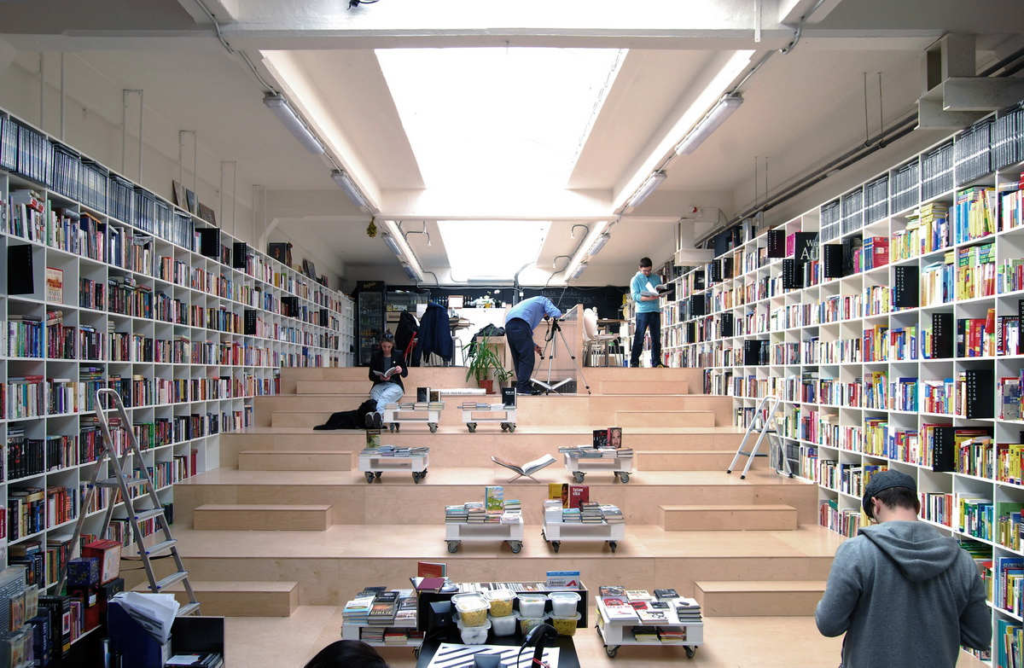
Many public libraries now feature cafes attached to them, or small coffee kiosks inside.
Without a doubt, this is the cheapest option on this list.
The coffee is plain but drinkable. The atmosphere is quiet. The Wi-Fi is free. And the seating? Big, comfortable and made for extended periods.
Average cost:
- Coffee or tea: $1–$3
- Library Wi-Fi and seating is in many cases totally free without a purchase
Who this is perfect for: Students, writers and anyone who needs to focus deeply. Libraries are designed for concentration. Add a coffee point, and you’ve got an ideal budget laptop setup.
What to watch out for: Some libraries have no-food-or-drink zones near the computers. Stay in the reading room or cafe area.
4. The Bakery-Cafe Combo
Think: croissants under glass, a handful of small tables and a chalkboard menu pinned to the wall.

Bakery-cafes are ubiquitous and almost always cheaper than dedicated coffee-shop chains. They are a baked goods shop first, so they often sell their drinks at lower prices to bring in foot traffic.
What you’ll typically spend:
- Coffee: $2–$3.50
- A pastry to go with it: $2–$4
- Total for a whole morning of work: less than $8
These places tend to attract a quieter crowd. You won’t encounter many raucous business meetings or group study sessions here. It’s often people working alone and quiet couples — ideal for concentration.
Downside to know: Outlets and Wi-Fi can be hit or miss — always check before you settle in. If a bakery-cafe doesn’t have Wi-Fi, it’s still a solid choice if you have mobile data and just need a quiet place with good vibes.
5. The Fast Food Place With Tables (The Underdog Choice)
Okay, hear us out.
Any place you can get fries — McDonald’s, Burger King, Tim Hortons or your local equivalent — is a laptop cafe in theory if you use it properly.
They have free Wi-Fi. They have outlets almost everywhere. Food and drinks are reasonably priced. And they are open long hours — sometimes 24/7.
Cost breakdown:
- Coffee: $1–$2
- Basic meal combo: $5–$8
- Total for a half-day work session: $6–$10
Yes, it’s not glamorous. Yes, the vibe is not exactly “creative writing in Paris.” But if you’re looking to spend very little and want a place with decent internet, it works out surprisingly well.
When this is the best choice: Late-night deadlines. Locations with no cafes nearby. When everywhere else is closed. Fast food places are ideal when nothing else works.
How to Stretch Your Dollars at Any Laptop Cafe
Finding a cheap cafe is step one. The real skill is stretching your budget once you’re there.
Order Strategically Don’t order the most expensive item on the menu simply because you feel guilty. A plain black coffee or a tea is perfectly fine. Most cafe workers don’t care what you order — they care that you ordered something.
Go During Off-Peak Hours Most cafes offer discounts before 10 AM and after 3 PM. Ask about daily specials. Sometimes a $5 latte becomes a $3 latte.
Bring Your Own Snacks Hungry after two hours? Don’t buy a $6 sandwich. Pack something from home. Most cafes won’t mind if you have a granola bar or some fruit in your bag.
Bring a Power Bank If outlets are scarce, a good power bank can give your laptop extra juice. It’s a one-time investment that pays off every single time.
Use Loyalty Apps Big names like Starbucks, Dunkin’ and Tim Hortons all have apps with free drink perks. Use them. It adds up to a free drink every few visits.
Cafe Etiquette: How to Be the Customer Everyone Loves
Being a good guest matters. It improves your experience, keeps you welcome and is simply the right thing to do.
Always Buy Something Even at the most budget-friendly of cafes, purchase something. That’s the unspoken contract that allows you to occupy the space. Think of it as your “desk rental fee.”
Don’t Hog Multiple Tables One person, one table. Reduce your footprint during busy periods. Rest your bag on your lap, not the seat next to you.
Use Headphones Nobody wants to hear your Zoom call through your laptop speakers. Always bring earbuds or headphones.
Keep Your Voice Down You’re in a shared space. Phone calls should be brief and quiet, or take them outside.
Clean Up After Yourself Wipe your table. Throw away your cup. Leave the space as you found it — or better.
Summary: All 5 Cafe Types at a Glance
| Cafe Type | Average Cost (Per Visit) | Wi-Fi | Outlets | Noise Level | Best For |
|---|---|---|---|---|---|
| Local Independent | $2–$5 | Usually yes | Sometimes | Low–Medium | Relaxed long sessions |
| Coworking Cafe Hybrid | $5–$15 | Fast & reliable | Yes | Low | Focused work |
| Library Cafe | $0–$3 | Yes (free) | Yes | Very low | Deep focus, studying |
| Bakery-Cafe Combo | $4–$8 | Sometimes | Sometimes | Low | Quiet solo work |
| Fast Food Chain | $6–$10 | Yes | Usually yes | Medium | Budget sessions, late nights |
How to Find Cheap Laptop Cafes Near You
No special app required, no secret knowledge. Here’s how to uncover cost-effective places in your own city.
- Google Maps: Search “cafes near me” then filter by reviews that mention “laptop,” “Wi-Fi,” or “work.” Check the reviews — people almost always note whether outlets are available.
- Yelp or TripAdvisor: Filter by price ($) and look for photos with interior seating. If outlets are visible in the photos, that’s a positive sign.
- Reddit: Search [your city] + laptop cafe. Local subreddits offer no-nonsense recommendations from real people.
- Ask Around: Seriously. Just ask a local student, freelancer or barista. They know the hidden gems that won’t show up on search engines. You can also check out Laptop Cafe Guide for curated recommendations and tips on finding the best spots to work from.
Warning Signs When Choosing a Cafe
Not all inexpensive cafes are a great deal. A few warning signs to watch out for:
- No visible plugs and staff who “don’t know” where they are — Usually means laptop users aren’t really welcome.
- Signage that reads “30-minute Wi-Fi limit” — Avoid if you’re planning a long session.
- Super crowded all the time — You’ll struggle to find a seat and the Wi-Fi will be slow.
- No proper seating — Leaning counters and high-top bar stools aren’t sustainable for a three-hour work session.
- Staff are rude when you ask about Wi-Fi or outlets — The atmosphere says it all.
FAQs About Cheap Laptop Cafes
Q: Is it rude to linger for hours in a cafe with just one drink? It depends on the cafe and how busy it gets. Most cafes won’t mind during slow hours. If the place is packed, order a little something extra or step out at lunch. Reading the room is key.
Q: What’s the least amount I can spend and still feel comfortable staying long? The general rule is one drink. If you’re there for more than two hours, consider getting a refill or a small snack. It’s a small gesture that makes a big difference.
Q: Are library cafes really free? The library itself is free. The in-house cafe kiosk charges for drinks, but they tend to be extremely inexpensive. At some libraries you don’t even need to spend any money — you can simply use the reading room with free Wi-Fi.
Q: How can I tell whether the Wi-Fi will be fast enough before I go? Call ahead and ask. Or check recent Google reviews — Wi-Fi speed comes up in comments quite often. Once you’re there, use Speedtest.net to check. Ten Mbps or higher works well for most tasks.
Q: What if I need to take a video call while I’m at a cafe? Yes, but be mindful. Wear earphones, keep your voice down and sit away from other customers. If the call is likely to be loud or lengthy, step outside.
Q: What should I always bring to a laptop cafe? Laptop charger, earphones, a water bottle (to stay hydrated without buying extra drinks), a small snack and your phone to use as a hotspot backup if the Wi-Fi fails.
Q: Is a fast-food place really acceptable for serious work? Surprisingly, yes — for the right kind of work. Data entry, writing, research and email management all work well. Video editing or design work that requires a quiet environment and serious concentration? A coworking cafe might be a better fit.
Wrapping It All Up
You don’t need to pay for a fancy coworking space membership or splurge on a $7 latte in order to do good work.
The five laptop cafe types in this guide — local independent shops, coworking cafe hybrids, library cafes, bakery-cafe combos and fast food chains — span every budget range and every kind of work style. Some will cost you virtually nothing. Some are a small price to pay for big productivity gains.
The trick is knowing what you need, finding where to get it, and then being a respectful guest when you arrive.
Choose one type of cafe from this list to start with. Try it for a week. Compare how your focus, mood and output differ from working at home.
You’ll probably never want to return to the couch.
So grab your laptop, find a place to sit and get to work.