

If you’ve ever tried to work from a coffee shop and found yourself stuck in slow Wi-Fi, frozen screen, toddler-screaming-two-tables-down territory — this one’s for you.
The average person thinks “laptop cafe” just means dragging your MacBook to Starbucks. But there is an entire world of hidden gems beyond that. These are places where the outlets actually work, the noise level stays reasonable, and the barista doesn’t give you a dirty look for sitting still for three hours.
This guide focuses on five hidden laptop cafe gems — the kinds of spots that seasoned remote workers share behind closed doors but rarely log on Google Maps. You’ll also discover what to check before you settle in, how to spot a bad workspace before you even order your coffee, and how to get the most out of any cafe session.
Let’s dig in.
What Makes a Laptop Cafe a True “Hidden Gem”?
Before we get into the list, let’s establish what separates a great laptop cafe from an ordinary coffee shop.
A genuine hidden gem meets all of these criteria:
- It’s not overcrowded. Crowded cafes kill productivity. A gem has typically not yet caught an influencer’s attention — it hasn’t gone viral.
- The Wi-Fi is reliable. Not just present — fast and consistent. We’re talking 25 Mbps or higher, and it shouldn’t require you to reboot the router yourself.
- There are enough power outlets. Nothing is worse than watching your battery dwindle to 12% with no socket in sight.
- The atmosphere feels right. Some people want quiet. Some want background buzz. A gem matches that energy without imposing it on you.
- The staff is relaxed about longer stays. This is the big one. A decent laptop cafe doesn’t check in on you every half hour asking, “Would you like anything else?”
Gem #1 — The Neighborhood Roastery Right Under Your Nose
Every city has one of these: a small coffee roastery tucked into a less trendy spot. It tends to be next door to a dry cleaner or a hardware store. It doesn’t have a big sign. It doesn’t appear on the first page of Google results.
And that’s exactly why it works so well.
Why Roasteries Are Great for Long Laptop Sessions
Roasteries attract a different sort of crowd. The customers are generally there for the coffee itself — not for Instagram content or a quick catch-up meeting. That makes for a quieter, more attentive environment.
They also tend to have:
- Long wooden tables for spreading your gear out
- Music played at a volume that feels like background texture, not a concert
- Rotating seasonal menus that give you a reason to come back next week
How to Find Yours
Don’t search for “best cafe.” Instead, search for something like “single origin coffee” or “micro roastery” in your city. You’ll land in a whole new category of results. Ignore places with 1,000+ reviews. Aim for spots with 80–200 reviews but a high rating (4.6 stars or higher). Those are typically the hidden ones, known mainly by locals.
Pro tip: Ask any barista at a specialty shop, “Do you know of a quieter spot around here?” Baristas talk. They know the terrain better than any app.
Gem #2 — The Bookshop Cafe That’s Also a Working Library
There is a certain magic in working at a bookshop cafe. The shelves absorb sound. The vibe is automatically calm. Nobody tries to be loud because everybody respects the space.
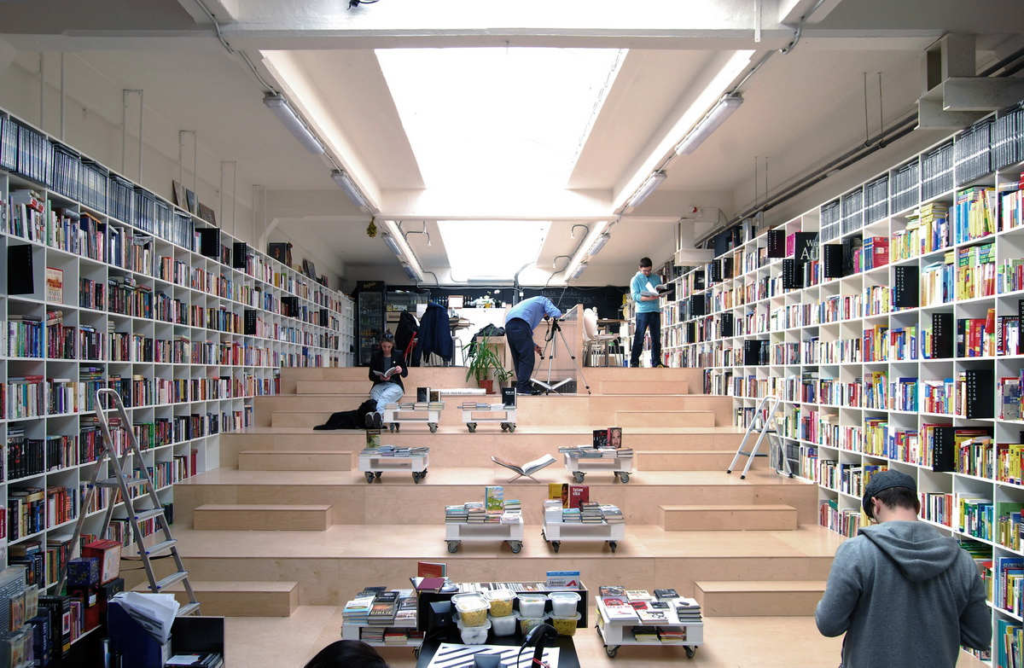
Such spots are becoming increasingly common as physical bookshops seek new ways to survive. Many have created a cafe corner with proper seating, working espresso machines and surprisingly fast Wi-Fi.
What to Expect
| Feature | Typical Bookshop Cafe |
|---|---|
| Noise Level | Very Low |
| Wi-Fi Speed | Medium (15–40 Mbps) |
| Outlet Availability | Moderate |
| Seating Comfort | High |
| Time Limit Policy | Rarely enforced |
| Coffee Quality | Varies |
The Best Times to Go
Weekday mornings between 9 AM and noon are the golden hours at a bookshop cafe. Most shoppers arrive in the evening or on weekends to browse. During that morning window, you’ll often have the entire place nearly to yourself.
These places also tend to play soft background music — classical, jazz, or folk — and research shows this can enhance creative thinking and writing output.
Gem #3 — The Cafe in a Museum or Cultural Center
This one seems obvious once you hear it, but almost no one thinks of it.
Museums and cultural centers have cafes. Nice ones. And because these cafes are primarily there for museum patrons, they tend to be quiet, well-designed and not crowded with remote workers competing for outlets.
Why This Works So Well
Museums are designed to impress, and their cafes are no different. They usually have:
- Lofty ceilings that reduce the feeling of being cramped
- Solid wood or metal furniture you can actually sit at comfortably for hours
- Big windows for natural light — a genuine mood and visibility improvement when working on a screen
- A high standard of food (because a bad cafe experience would undermine the whole museum visit)
You also get the bonus of being surrounded by art, history or science — which can be surprisingly inspiring when you’re grinding through a dull spreadsheet at 2 PM.
What About Wi-Fi?
Museum cafes can be hit or miss on Wi-Fi. Some are excellent. Some are poor. Before you settle in:
- Ask staff for the Wi-Fi password and test it before ordering
- Run a quick speed check at Speedtest by Ookla
- Confirm it’s not shared with the museum’s public network — if it is, expect slower speeds during peak hours
Things to Always Check Before Getting Comfortable in Any Laptop Cafe
Before you unpack your gear at any new spot, run through this quick checklist:
- ✅ Wi-Fi speed tested — at least 25 Mbps for comfortable work, 10 Mbps minimum
- ✅ Outlets confirmed — located and verified working before you sit
- ✅ Noise level assessed — spend 2–3 minutes just listening before you commit
- ✅ Seating comfort checked — can you sit here for 2–3 hours without back pain?
- ✅ Time limit policy known — any signs or staff instructions about staying duration?
- ✅ Order expectations understood — what’s the minimum spend to occupy the space respectfully?
For a deeper breakdown of what to look for in every type of workspace, Laptop Cafe Guide has detailed reviews and recommendations to help you find the right spot.
Gem #4 — The Co-Working Hub That Happens to Be a Cafe
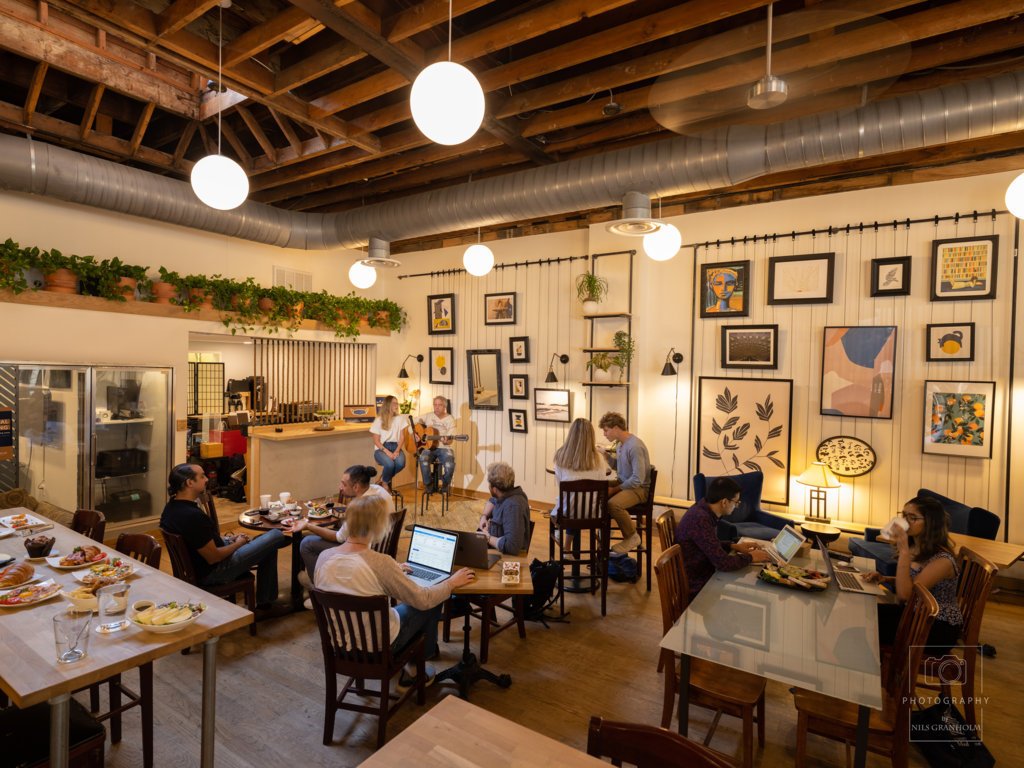
Almost every mid-size and large city has one of these — yet hardly anyone talks about it as a laptop destination.
Here’s how it works: a co-working space opens a public-facing cafe. You walk in, pay for a coffee and gain access to a section of the space. It’s not the premium private desks or the phone booths — but it is a proper table with broadband, real ergonomic chairs and a culture that understands what silence means.
Why This Is Underrated
The cafe section is open to the public, and most people don’t know it. They assume the entire building is “members only.” This means the cafe area is usually far less crowded than it should be.
You also get:
- The fastest Wi-Fi of any spot on this list — co-working spaces genuinely invest in their internet infrastructure
- Access to shared printing facilities where available
- A working environment where you actually feel like you’re “at work”
- A separate quiet zone that is properly enforced
The Catch
Coffee and food are priced at a slight premium — you’re paying, indirectly, for the quality of the workspace. Budget approximately 20–30% more per visit than at a regular cafe. For most people, it’s worth it.
How to find these: Search “co-working space cafe” or “hot desk cafe” in your city. Look for establishments whose websites mention a “community area” or “drop-in lounge.”
Gem #5 — The Hotel Lobby Cafe Nobody Talks About
This is the biggest overlooked laptop cafe gem on this entire list.
Many hotel lobbies — especially boutique hotels and business hotels — have cafes or lounge-style areas open to the public. These spaces are designed to impress visitors. That means quality furniture, a calm atmosphere, solid Wi-Fi and staff trained to be professional without hovering over you.
And because most people don’t realize these spaces are open to the general public, they’re nearly always quiet.
What You Get at a Hotel Lobby Cafe
| Perk | Why It Matters |
|---|---|
| Premium seating | Big, comfortable chairs and real tables — proper conditions for long sessions |
| Quiet atmosphere | Hotel guests don’t want noise, so the whole lobby stays calm |
| Reliable Wi-Fi | Hotels invest in connectivity for business travelers |
| Clean restrooms | Always nearby and always maintained |
| Food service | Full meals available if you want them |
| No time pressure | They don’t rush paying customers |
The Unwritten Rule
You need to order something. One drink per couple of hours is the respectful minimum. Most hotel cafe drinks are priced somewhere between a coffee shop and a restaurant — plan for that.
Business hotels near city centers and airports are your best bet. Boutique hotels next to arts districts are a very strong second.
How These Five Gems Compare
| Spot | Wi-Fi Speed | Noise Level | Outlet Access | Seating Comfort | Laptop-Friendliness |
|---|---|---|---|---|---|
| Neighborhood Roastery | 7/10 | 8/10 | 6/10 | 7/10 | 7/10 |
| Bookshop Cafe | 6/10 | 9/10 | 6/10 | 8/10 | 7/10 |
| Museum Cafe | 6/10 | 9/10 | 5/10 | 8/10 | 7/10 |
| Co-Working Hub Cafe | 10/10 | 8/10 | 10/10 | 9/10 | 10/10 |
| Hotel Lobby Cafe | 9/10 | 9/10 | 8/10 | 10/10 | 9/10 |
All scores out of 10 and based on average experiences — individual locations will vary.
The Unwritten Rules of Working From a Cafe
Finding a good laptop cafe is one thing. Being a good guest is another.
Remote workers who get asked to leave — or receive pointed looks from staff — are typically breaking one of these unspoken rules:
- Buy something every 90 minutes. This is the golden rule. A cafe is not a library — it’s a business. A coffee, a snack, a glass of water. Just keep the tab going.
- Use headphones for calls. Using speakerphone in a cafe is the social equivalent of eating a rancid lunch on a packed bus. Don’t do it.
- Don’t take more than one seat. Your bag doesn’t deserve its own chair. Keep your setup compact.
- Keep your voice down. You’re in a shared space. Other people have paid for their peace too.
- If you linger, tip generously. It builds goodwill and keeps the cafe laptop-friendly for everyone who comes after you.
How to Build Your Own Laptop Cafe Rotation
The smartest remote workers don’t pick one place and stay there forever. They build a rotation.
Here’s a simple system that works well:
Have a primary spot. This is your go-to. You know the layout, the staff, the Wi-Fi password. You can walk in and set up in under three minutes.
Have two backup spots. These are for when your go-to is too busy, too loud or just not calling to you that day.
Have one “inspiration spot.” This is where you go when you’re stuck on a project. Different environments trigger different thinking. The museum cafe is perfect for this.
Have one “serious work spot.” This is where you go when something absolutely needs to get done. The co-working hub cafe is built for exactly this.
Rotate weekly, not daily. You want consistent workflow but a novel environment.
Warning Signs of a Laptop-Hostile Cafe
Watch for these red flags, no matter how friendly a place seems:
- Outlets covered with tape or blocked by furniture. This is intentional. The cafe doesn’t want you hanging around.
- Wi-Fi password changes daily and isn’t posted anywhere. You’ll spend five minutes hunting for it every single time.
- Chairs are deliberately uncomfortable. Hard, backless stools send a passive message: drink your coffee and move on.
- Music is very loud. Many cafes use volume as crowd control. Concentration becomes difficult above 70 decibels.
- Staff does welfare checks every 20 minutes. This may look like good service. It is also a subtle reminder to wrap things up.
Being aware of these signs can save a significant amount of time and frustration.
FAQs About Finding Laptop Cafe Gems
Q: Is it bad manners to work out of a cafe for several hours? Not at all — as long as you keep buying things and aren’t taking up too much space during a rush. Many cafes actively welcome remote workers because they bring consistent revenue during slower hours.
Q: How fast a Wi-Fi connection do I really need to work comfortably from a cafe? For general browsing and email, 10 Mbps is sufficient. For video calls, you want at least 25 Mbps up and down. If you’re moving large files or streaming during a work session, aim for 50 Mbps or higher.
Q: Do I need a VPN in a laptop cafe? Yes, always. Public Wi-Fi networks — even in nice cafes — may not be encrypted. A VPN keeps your login details, work files and personal data secure. Setting one up takes just a few minutes.
Q: Is there a particular time of day that’s best to visit a laptop cafe? The sweet spot is weekday mornings between 8 AM and 11 AM. The lunch crowd (noon–2 PM) can be packed and loud. Mid-afternoon (3–5 PM) is usually moderate.
Q: What’s the best way to find small, under-the-radar cafes that aren’t on popular apps? Ask baristas at places you already enjoy. Search your city’s local remote work Facebook groups or Reddit threads. Use Google Maps with “quiet” or “good for working” as search filters. Hidden gems tend to have fewer reviews but a strong word-of-mouth following.
Q: Do hotel lobby cafes really let you stay without being a guest? Yes, in most cases. Hotel cafes are revenue-generating spaces. You’re welcome as long as you’re a paying customer. Business hotels and boutique hotels tend to be more accommodating than budget chains.
Q: Is it better to pack noise-canceling headphones or search for a quiet cafe? Both, ideally. Background noise happens even in quiet cafes. A good pair of noise-canceling headphones is the single best investment a remote worker can make — it turns any cafe into a focused work environment.
Q: What should I pack in a “cafe work bag”? Keep it simple: laptop charger, a USB hub, a short extension cord (a must), headphones, a phone stand for video calls and a snack if food options at the cafe are limited.
Closing Up — Your Laptop Cafe Journey Starts Now
The best laptop cafe gems aren’t waiting on a “Top 10” list. They’re waiting down a side street, behind the entrance of a museum, at the front of a co-working building, or in a hotel lobby you’ve walked past a hundred times.
What makes these places special is not only the coffee or the Wi-Fi. It’s the atmosphere, the community — the sense that you’re in a space built to let you do great work.
Use the five gems in this guide as jumping-off points. Apply the checklist. Build your rotation. And when you find your own special place — the one that brings you back to focus in a way only it can — protect it like the treasure it is.
A good laptop cafe guide is not just a list. It’s a habit.