

Everything you need to know to find a cafe that works as hard as you do.
Ever sit down at a coffee shop, amped up to get some work done, only for the WiFi to be slower than dial-up? Or perhaps the seats are so uncomfortable you walk out after 30 minutes? You’re not alone.
Those trends have only accelerated in recent years, with many millions of people working remotely, studying outside the classroom and starting businesses from their laptops. This shift has made WiFi cafes one of the most crucial places in contemporary life. But not every one of them is created the same.
This Laptop Cafe Guide lays out all the information you need for a smooth ride. We discuss 10 types of WiFi cafe, what makes them great, and how to find the best one for your purpose. Whether you’re a student, freelancer or just someone who needs to get away from it all in order to work, this guide has you sorted.
The new office: why WiFi cafes are it now
The conventional office is no longer the only place to work. A 2023 report indicated that more than 16% of companies around the world are fully remote. Millions more have hybrid setups.
Individuals and remote workers require places that offer:
- Fast, stable internet
- A calm environment
- Power outlets nearby
- Good food and drinks
- Comfortable seating
WiFi cafes check all of these boxes — when you hit the right one. The tricky bit is knowing what to look for.
What to look for in a good laptop cafe
Before getting into particular cafes, here are the basics. Not every WiFi cafe is worthy of your laptop time.
Speed is more important than you realise
A cafe advertising “free WiFi” might offer you speeds just fast enough to load a web page. For serious work, you want a minimum of 25 Mbps download speed. Video calls need even more — at least 10 Mbps per call.
Power outlets are non-negotiable
Nothing turns a productive session into a disaster quite like running out of battery. Most tables at a good laptop cafe will have outlets on or near them.
Your focus is everything — and so are noise levels
Some cafes are filled with energy — great for casual browsing, terrible for deep work. Others are quieter, with a library-like ambience. Know ahead of time which fits your work style before you commit.
The seating setup matters
Wooden stools look great in photos. After two hours, they feel terrible. Choose cafes with proper chairs and table heights that enable good posture.
10 best laptop cafe types (and what each provides)
Not every cafe suits every person. Here are 10 types of laptop cafe to know — each with its own strengths.
1. The classic specialty coffee shop
Best for: Writers, designers and solo workers who thrive in a tranquil, artsy environment.
Think pour-over coffee served at communal tables under exposed brick walls while lo-fi music plays softly. These spaces draw creatives and freelancers who want quality coffee to accompany their workflow.
What to expect:
- Single-origin coffee and quality drinks
- WiFi speeds of 20–50 Mbps in general
- Quieter atmosphere on weekdays
- Fewer outlets — arrive early to claim one
Watch out for: Rush periods (generally 8–10 AM and 12–2 PM) when tables fill up and noise levels rise.
2. The coworking cafe hybrid
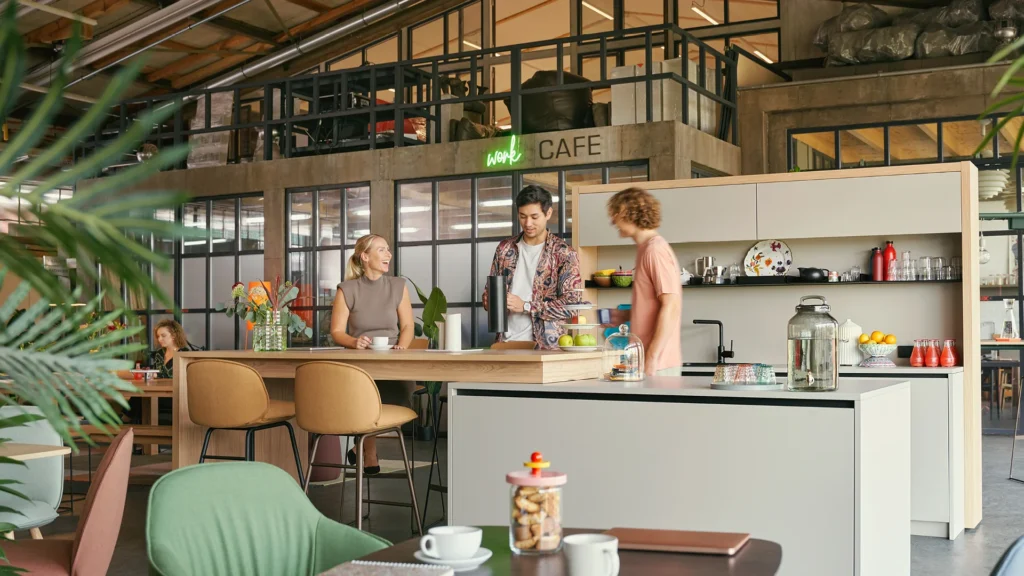
Best for: Freelancers and remote employees who want reliability all day.
This is a newer concept — part cafe, part coworking space. You pay a nominal daily fee or meet a minimum spend, and in return you get guaranteed seating, fast WiFi and printing services.
What to expect:
- Typical WiFi speeds of 50–100 Mbps+
- Dedicated desks or private booths
- Professional atmosphere
- Sometimes private call rooms
Watch out for: Daily fees can add up quickly if you’re going every day. Compare prices to a proper coworking membership.
3. The 24-hour late-night spot
Best for: Deadline-driven students, freelancers serving international clients, and night-shift remote workers.
To all the night owls out there, this one is for you. Some cafes remain open late or around the clock — lifesavers when you’re up against a deadline or working across time zones.
What to expect:
- Open past midnight or overnight
- Usually located near universities or city centres
- Good lighting — critical for night work
- Strong coffee — obviously
Watch out for: Noise levels that can soar late at night if a party crowd moves in.
4. The bookstore cafe
Best for: Readers, writers, students and anyone requiring a focused, distraction-free zone.
Picture yourself enjoying a latte among thousands of books. Bookstore cafes offer a vibe that’s both conducive to focus and warm. Chains such as Barnes & Noble have been doing it for decades, but independent bookstore cafes are an even better find.
What to expect:
- Very quiet, respectful atmosphere
- Usually mid-range WiFi (20–40 Mbps)
- Comfortable armchairs and tables
- Not a huge range of food, but excellent hot drinks
Watch out for: Some have a no-laptop-at-soft-seating policy on busy days.
5. The college campus cafe
Best for: Those who need fast WiFi, plenty of outlets and a study-friendly vibe.
Many campus cafes are open to the public even if you aren’t a student. University coffee shops tend to come with all the student-friendly perks, making them excellent for laptop work.
What to expect:
- Excellent WiFi — campuses invest heavily in internet infrastructure
- Affordable food and drinks
- Long opening hours
- A young, focused crowd
Watch out for: They fill up quickly during exam season. Arrive early or have a backup plan.
6. The hotel lobby cafe
Best for: Client calls, professional meetings, or whenever you want a polished, impressive setting.
This one is an underrated gem. Many hotels have cafes or coffee bars in their lobbies. They’re designed to be professional, quiet and inviting — and since hotels need to serve business travellers, the WiFi is generally very good.
What to expect:
- Fast and steady WiFi
- Very professional, low-noise environment
- Premium drinks — and premium prices
- Comfortable lounge seating
Watch out for: A “guests only” policy at some properties. That said, most hotel cafes are open to the public.
7. The library cafe
Best for: Deep focus work, research, writing and studying.
More libraries are incorporating cafes or coffee corners. That’s a match made in heaven: library-level quiet with cafe-level comfort. You can drink something hot while you work, without anyone shushing you for typing.
What to expect:
- Great WiFi — libraries are publicly funded and often have excellent bandwidth
- Very quiet, focused atmosphere
- Affordable or even free access
- Long hours, especially at university libraries
Watch out for: Not all library cafes permit food, and some have strict quiet-zone policies that make phone calls tricky.
8. The plant-based or wellness cafe

Best for: Design-minded workers who want good food alongside good vibes.
These cafes have exploded in popularity over the past five years. Think green smoothies, oat milk lattes and lots of natural light. They attract a calm, mindful crowd — making them surprisingly good places to open your laptop.
What to expect:
- Bright, airy, Instagram-worthy interiors
- Good WiFi (though sometimes inconsistent)
- Healthy food options — ideal for extended sessions
- A relaxed, low-pressure vibe
Watch out for: Higher prices. A smoothie bowl and an oat latte can cost more than you’d expect.
9. The rooftop or outdoor cafe
Best for: Creative brainstorming, casual meetings or quick email catch-ups on a sunny day.
Sometimes you just need some fresh air. More cities than you’d think have rooftop cafes and outdoor patios with WiFi. They’re not ideal for all types of work, but for creative tasks or light browsing they can’t be beaten.
What to expect:
- Great scenery and a healthy atmosphere
- Inconsistent WiFi — outdoor signals can be patchy
- Seasonal availability in colder climates
- Limited power outlets — bring a fully charged laptop
Watch out for: Screen glare on sunny days. A matte screen protector helps a lot.
10. The gaming or tech cafe
Best for: Developers, video editors, streamers or anyone with high-bandwidth tasks.
Gaming cafes are no longer exclusively for gamers. Many have evolved into fully equipped tech hubs with high-speed internet, ergonomic chairs and all-day passes. WiFi speeds here tend to be the fastest you’ll find anywhere.
What to expect:
- WiFi speeds from 100 Mbps to 1 Gbps
- High-performance setups — some let you connect to their monitors
- Hourly or daily rate system
- Usually open late or 24/7
Watch out for: Noisy gaming sounds and a rowdy atmosphere that not everyone enjoys working in.
How to test a cafe before making the commitment
Don’t ruin a workday by settling into a bad laptop cafe. Here’s a short checklist to run through when you arrive.
1
Test the WiFi immediately. Use a free speed test app — Speedtest by Ookla is one of the most popular. If speeds are below 15 Mbps, that’s a warning sign for anything beyond basic browsing.
2
Count the outlets. Walk the room before you take your seat. If outlets are scarce, stake one out early.
3
Listen for a minute. Sit still. Can you work in this background noise? Some people love ambient sound. Others hate it. Know yourself.
4
Check the seat. Sit in the chair you intend to use. Can you comfortably rest your elbows? Is the table height right? Your body will thank you later.
5
Buy something first. Most cafes expect you to be a paying customer. It’s good etiquette, and it also earns you the right to stay.
Unwritten rules of laptop cafe etiquette
Good behaviour at a WiFi cafe makes the experience better for everyone — including you.
No table hogging during rush times
If the place is packed and you’ve been sitting for four hours with a single coffee, it might be time to step outside. Most cafes appreciate customers who purchase something every 90 minutes or so during busy periods.
Keep your voice down on calls
Use headphones. If the cafe is quiet, step outside for long calls. Nothing disrupts a focused atmosphere like someone talking loudly on the phone — and no one around you signed up to listen.
Clean up after yourself
Scattering crumbs, empty mugs and papers across the table makes you a poor guest and creates unnecessary work for cafe staff.
Don’t spread out unnecessarily
If the cafe is packed, don’t use the chair next to you as personal bag storage. Stay in your lane and keep it compact.
The top apps and tools for finding laptop-friendly cafes
You don’t have to guess. Here are a few tools that make finding WiFi cafes near you much easier.
- Workfrom — A platform built specifically for remote workers, with reviews on cafes, coworking spaces and other work-friendly spots. Filter by WiFi speed, noise level and more.
- WiFi Map — Crowdsourced passwords and speed data from locations worldwide. Especially useful when travelling.
- Google Maps reviews — Search “cafe with WiFi” and read recent reviews. WiFi quality and noise level are often mentioned in the comments.
- Yelp filters — Filter cafes by “good for working.” A quick way to locate laptop-ready spots.
- Foursquare — User tips covering WiFi and workspace quality at specific locations.
Staying safe on public WiFi
Public WiFi is convenient, but not always secure. Here’s how to protect yourself when working from a cafe.
Always use a VPN
A VPN (Virtual Private Network) encrypts your traffic. Even if someone is monitoring the cafe’s network, they can’t read your data. Popular, user-friendly options include ProtonVPN, NordVPN and ExpressVPN.
Avoid accessing sensitive accounts
Never log in to your bank or transfer money over public WiFi without a VPN. Keep that for your home connection or mobile data.
Turn off file sharing
Make sure your device isn’t configured to share files publicly. On Mac: System Settings > Sharing. On Windows: go to your Network settings and set it to “Public Network”.
Use HTTPS sites only
Most modern sites use HTTPS for a layer of encryption. Before entering any passwords, check for the padlock symbol in your browser’s address bar.
Creating your own laptop cafe rotation
The most effective remote workers don’t rely on a single cafe. They build a rotation — two or three go-to places suited to different needs.
An example setup:
- Morning deep work: A peaceful bookstore cafe or library cafe for two hours of undistracted output.
- Midday calls: A coworking cafe hybrid or hotel lobby with strong WiFi and space to step away.
- Afternoon creative work: A plant-based or specialty coffee shop with good vibes and decent internet.
Having options means you’re never scrambling when one place is closed, crowded or having a bad WiFi day.
FAQs: questions you have about laptop cafes
Am I allowed to sit in a WiFi cafe for hours?
There is no formal time limit at most cafes, but it’s considered good etiquette to purchase something every few hours. Some — like coworking cafe hybrids — have a daily access fee that covers unlimited use.
Is cafe WiFi safe for work?
It depends on what you’re working on. For everyday browsing, it’s generally fine. For anything involving sensitive data, use a VPN.
What should I bring to a laptop cafe?
A laptop charger, headphones, a water bottle and your laptop bag. For longer sessions, a portable laptop stand can also make a big difference to your posture.
When is the best time to visit a laptop cafe to avoid crowds?
Weekday mornings from 9–11 AM are the quietest. Avoid lunch hours (12–2 PM) and the after-school rush (3–5 PM).
Do I have to buy something to access the WiFi?
Most cafes expect you to be a paying customer. It’s both good manners and a practical requirement — in many cafes, the WiFi password is only given with a purchase.
How can I tell whether the WiFi is fast before committing to a seat?
Ask the barista — many will tell you honestly. You can also run a quick speed test on your mobile data before switching to the cafe’s network.
Do only gamers visit gaming cafes?
Not at all. Gaming cafes often offer the fastest WiFi of any cafe type and feature ergonomic seating. Most welcome remote workers, particularly during off-peak hours.
Which type of laptop cafe is the quietest?
Library cafes and bookstore cafes have the lowest noise levels. Coworking cafe hybrids can also be very quiet, especially those that enforce focus hours.
Conclusion: what you do next
Your laptop cafe helps set the rhythm for how you work. It’s not simply WiFi — it’s an entire environment working in concert to help you focus, feel comfortable and get things done.
This Laptop Cafe Guide has walked you through 10 solid types of WiFi cafe, what to watch out for, how to stay safe online and how to build a smart rotation tailored to your workflow.
Your action plan is simple. Choose two or three types from this guide that feel right for you. Visit them this week. Test the WiFi. Check the seats. Work for an hour, then notice how you feel. You’ll find out fast which ones deserve a place in your regular rotation.
Your ideal laptop cafe is out there. Now you know exactly how to find it.